Lab 5: Game kick-off
Your staging service can play a mission. Now let it make decisions for your real colony. Build a path from a reviewed change to production—and leave a useful record for the next person who releases it.
You can view the Lab 5 Slidedeck here
Goals and scope
- Catch invalid Kubernetes manifests locally and before merging.
- Deploy a tested, versioned image to production through GitLab CI.
- Choose a semantic version and document it in a changelog and GitLab Release.
No new strategy endpoint or decision-rule implementation is required for the first release. Get your colony playing, then improve it through reviewed changes. Group A carries its PostgreSQL and POI work into production; Group B does not add either requirement.
Update Gamehost version
Make sure to upgrade to the latest gamehost version! At the time of writing,
gamehost:0.5.2 is the latest version.
- Gamehost image:
gitlab.stud.atlantis.ugent.be:5050/devops/images/gamehost:0.5.2 - Gamehost helm chart:
gitlab.stud.atlantis.ugent.be:5050/devops/images/charts/gamehost:0.5.2
Competition and course marks
Lab 5 takes place during the trial period: use it to get your colony playing and test your release pipeline. At the start of Lab 6, the game is reset, including statistics, resources, growth, and the leaderboard. The competition then runs continuously; keep improving your colony alongside the remaining labs.
| Period | Start | End |
|---|---|---|
| Trial | 28 October 2026, 12:00 | 4 November 2026, 12:00 |
| Competition | 4 November 2026, 12:00 | 16 December 2026, 12:00 |
Your game score combines normalized military, economy, and population scores. Teams share one world and leaderboard, but competition placings for bonus points are determined within each course group:
| Placing within the group | Group A bonus | Group B bonus |
|---|---|---|
| 1st | 3 points | 3 points |
| 2nd | 2 points | — |
These are course bonus points, not game-score points. For both groups, normal lab marks total 50 points across the three checkpoints (10/20/20). Competition bonuses are added to that total; they do not replace the assignment requirements.
Before splitting the work
Start together at your Lab 4 staging deployment:
- Show each other a working mission. Choose a reviewed commit to release; leave unfinished strategy work for later.
- List what production needs before it can run: configuration, credentials, image access, and Group A's database. Which tasks depend on another teammate's decision?
- Create work items under the combined checkpoint milestone. Tracks A and B can start in parallel, but production deployment must wait for validation and configuration to be integrated and reviewed. Track C builds on your first release. Split the work or use peer programming; rotate who deploys and diagnoses so everyone can explain the result.
Three-hour session milestone: deploy v0.1.0, verify gamehost calls, and
create its GitLab Release. A changelog is optional for this first release:
start playing before setting up generation. Before the checkpoint, ship a
second release with generated notes as described below.
Track A: Validate your Kubernetes manifests
An indentation-correct manifest can still contain a misspelled Kubernetes field. Catch that mistake before it reaches either namespace with kubeconform.
A1. Validate locally
As with Maven and Jib in Lab 2, start locally:
Use the usage guide to enable strict checking and a summary.
Check the server with kubectl version and select matching schemas with
-kubernetes-version. Validate every rendered resource you deploy, including
environment variants from Track B—not values or templates. Commit the tool pin
in your project's mise.toml. If the version check shows another binary, try
mise exec -- kubeconform -v.
What about kubectl --dry-run?
kubectl --dry-run=client checks a request without sending it for server-side
processing; --dry-run=server also exercises server validation and admission
without persisting the resource. Server dry runs require cluster access.
Kubeconform provides a focused schema check in CI without a cluster; neither
schema checking nor a dry run proves the application will work at runtime.
A2. Make validation a required CI check
Adapt the upstream GitLab example, using our mirror:
gitlab.stud.atlantis.ugent.be:5050/devops/images/kubeconform:v0.8.0-alpine.
Keep the empty image entrypoint and invoke /kubeconform; it is not on
PATH. Use the same schemas and rendering approach as locally.
The required job belongs in verify and must run for MR, branch, and tag
pipelines. An invalid manifest must prevent merging, publishing, and deployment.
Do not bypass failures with allow_failure, || true, or
-ignore-missing-schemas.
A3. Prove the merge block, then recover
- On a branch, introduce one unknown Deployment field, such as
replicaas. Predict the error, then check locally and in an MR. - Ensure Settings → Merge requests → Pipelines must succeed is enabled. Wait for the failed pipeline to finish and confirm merging is blocked; do not enable auto-merge during this experiment.
- Correct or revert the fault in a new commit, inspect
git log, and obtain a green pipeline before merging. Keep the failed-then-fixed history; do not amend or force-push it away.
Track B: Join the live game through CI
Unlike your standalone staging gamehost, the staff-operated competitive
gamehost is already running. It calls your colony's logic automatically at
http://logic-service.group-N.svc.cluster.local (port 80) once your service
is available in group-N, your production namespace. Keep the Lab 4
Deployment, container, and Service names (logic-service).
Production is not another test environment
Do not install another gamehost in production. Trial-period deployment tests are allowed, but use staging to test application changes. After the reset, production decisions affect your competition colony.
Sign in to the live game UI with your UGent account and find your colony. Before deploying, decide what you will look for to tell whether your logic is actually playing. Revisit the game manual if needed: gathering resources only helps if you bring them home.
Keep your default-branch deployment to staging; add a separate production job. Before editing CI, sketch which events should deploy where.
Assignment: automate production deployment
Deploy the logic service to group-N only through CI, from a Git tag.
Start with any tag while debugging; the final rules must accept only
version tags, as described below.
No manual kubectl apply or set image of the
service in production. Inspection, logs, and port-forwarding are fine.
B1. Prepare the production dependencies
Namespaces do not share Secrets or storage. Before releasing:
- Check image access. Use Lab 4's registry setup to prepare
gitlab-credentialsingroup-Nand reference it from the Deployment. - Connect the right accounts. Staff provision
colony-basic-authingroup-N, with keysusername(valuegroup-N) andpassword. Your application expectsGAMEHOST_USERNAMEandGAMEHOST_PASSWORD. Bridge this difference with Secret-backed environment variables. Do not rename, overwrite, or copy the staff Secret; ask staff if it is missing. Group A: also create production POI viewer credentials forPOI_USERNAMEandPOI_PASSWORD, with a username different fromgroup-Nand a separate password. Use the Secret workflow. - Prepare storage. Group A: follow the production database guide
for separate PostgreSQL, credentials, and a PVC before the first tag.
Keep the
postgresprofile and application account; do not connect to staging's database. Manual Helm/Secret setup is allowed for dependencies, not the logic service. Group B: retain your existing storage setup.
B2. Decide how configuration differs between environments
Lab 4's Deployment reads GAMEHOST_USERNAME and GAMEHOST_PASSWORD from
logic-api-credentials, using keys with those same names. Production must read
them from colony-basic-auth, using keys username and password. Changing
only the namespace does not change those references.
Assignment: resolve the environment differences
Choose how to maintain and deploy both configurations. Show a teammate the rendered staging and production resources: which fields differ, which stay shared, and how will a future change reach both environments?
Possible starting points—not additional requirements:
- Separate YAML files: a quick start, but shared changes can drift apart.
- CI substitution/rendering: adapt the image-rendering approach from Lab 4 to supply environment-specific configuration.
- Kustomize overlays or another templating tool: tools are allowed, not required. Start with Kustomize's base/overlay guide.
- Align staging Secret names and keys with production: keep separate staging values and update both the logic Deployment and staging gamehost references. Do not change or copy the staff-managed production Secret. Group A: keep the POI viewer account separate from the gamehost account.
Also make the image field's role is explicit. Replace the old checked-in image
with a deliberate placeholder, for example
registry.invalid/logic-service:ci-must-replace. CI must replace it before
applying: staging uses $CI_REGISTRY_IMAGE:commit.$CI_COMMIT_SHORT_SHA, and
production uses $CI_REGISTRY_IMAGE:$CI_COMMIT_TAG, never latest. Do not commit
each upcoming release image into the manifest: Lab 2 only builds that image
when its tag pipeline runs, before deployment.
Validate both rendered environments with Track A's check, and inspect image, namespace, and Secret references; schema validation cannot tell whether you selected the right credentials. Never apply the placeholder directly.
Ready to tag when: dependencies exist and a teammate has reviewed both configurations. Keep secret values out of Git, release notes, and CI logs.
B3. Test production deployment with a disposable tag
Separate two questions: can a tag deploy? and which tags should deploy? Solve the first before adding the version restriction.
- Adapt Lab 4's job to target
group-N, keeping its course image and agent context. Production must deploy$CI_REGISTRY_IMAGE:$CI_COMMIT_TAG, neverlatest. Render the image before applying; retain one replica,Recreate, and a rollout timeout. - Use job rules and
$CI_COMMIT_TAGto allow any tag temporarily. Exclude MR and branch pipelines from production. Make deployment wait for image publication, manifest validation, and all existing tests (Group A: including PostgreSQL). Have a teammate review the job. - Merge the configuration, check staging, and coordinate a new tag such as
prod-test-1. Follow its pipeline through to production, then perform the runtime checks below. - If it fails, collect evidence with Lab 4's toolkit, fix through
an MR, and tag the corrected, staging-tested commit. Prefer a new trial tag
such as
prod-test-2; during the trial period you may instead delete and recreate a coordinated disposable trial tag. Never patch the production service to hide a pipeline problem.
These are real deployments, not dry runs. Test tags also update latest
under Lab 2's rules. Retry a failed job if no configuration change is needed;
deleting a Git tag does not undo a deployment or remove its registry image.
If you reuse a trial tag, verify that CI actually rolls out and pulls the rebuilt
image: an unchanged image reference may leave the old container running.
Once a version is published, keep its tag immutable: corrections get a new
version, not a moved tag.
B4. Restrict production to version tags
Replace the temporary any-tag rule with one matching the whole
vMAJOR.MINOR.PATCH format; merge it before creating v0.1.0. Use
job rules to work out the expression. Test a valid version, a
checkpoint tag, and a name that only partly resembles a version. The final
behaviour must be:
| Trigger | Deployment |
|---|---|
| MR or feature-branch push | None; verification still runs |
| Default-branch push | Staging, as in Lab 4 |
Release tag vMAJOR.MINOR.PATCH |
Production |
Other tag, e.g. Checkpoint1 |
None; still verify and publish |
Check your predictions against real pipelines: use v0.1.0 in B5 as the positive
case, and push a non-version trial tag after the final rules are merged to
confirm it excludes deployment. Also check a partly matching name such as
test-v0.1.0. Staging must still use commit.$CI_COMMIT_SHORT_SHA.
Pipeline simulation is not required.
B5. Release v0.1.0 and check the service
A Git tag names a commit; a deployment runs its image; a GitLab Release records what changed. Create all three:
- Confirm the version-only rule is merged and staging works. Create and push
an annotated
v0.1.0tag on that reviewed commit. - Follow the production pipeline and perform the runtime checks below.
- Use GitLab's release instructions to create a Release for the existing tag. Include a short description, full image reference, and successful deployment pipeline link. A generated changelog can wait until Track C.
Runtime checks
A green pipeline is a starting point, not proof that your colony can play. Use Lab 4's toolkit to answer these questions:
- Is this the release you intended? Compare the running image with the tag pipeline's published image and the reviewed, staging-tested default-branch commit.
- Did the application stay up? Inspect startup logs and restart counts, not just rollout completion. Without readiness probes (Lab 7), Kubernetes can briefly report a crashing application as ready.
- Is the gamehost using it successfully? Look for Mission API requests producing decisions and match that evidence with activity in the live UI. Default INFO logs may show no successful calls; reuse Lab 4's targeted DEBUG logging or add request/decision logging without exposing credentials.
If any answer is unclear, diagnose before calling it a successful release. Fix through an MR and a new version tag, not a production patch or a moved release tag. B3's disposable-tag exception applies only to trial deployments.
Track C: Make releases repeatable
Your colony is now playing. Before the checkpoint, ship a meaningful improvement and leave the next releaser a repeatable workflow.
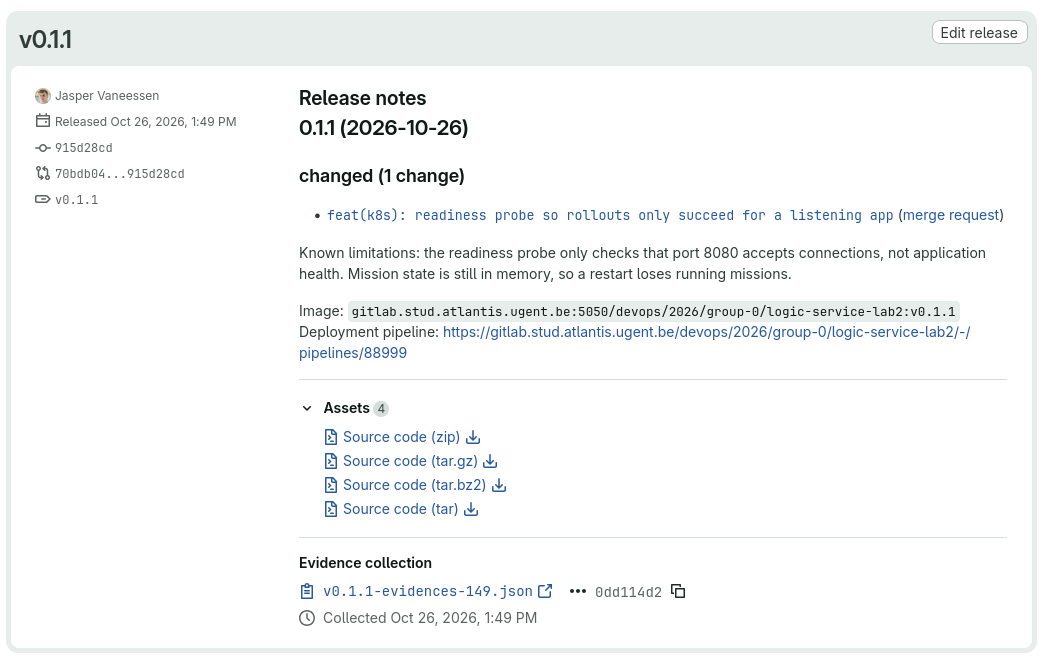
Example GitLab Release page:
C1. Understand the changelog and release notes
A changelog is a maintained record of notable changes, grouped by version
and date, rather than a dump of every commit. Keep one cumulative
CHANGELOG.md in your repository: add each new version's section at the top,
below the file heading, and retain earlier entries. Over time, this file grows
into the project's release history.
Release notes describe one release. Reuse that version's reviewed changelog section in its GitLab Release, alongside the image and deployment pipeline link. Generating a draft saves work, but teammates must still check its accuracy.
C2. Capture release-relevant changes through merge requests
Which merged changes would you want to find in release notes a month from now?
GitLab's
changelog generator selects commits with a Changelog:
trailer, not just a Conventional Commit title. Build that signal into your MR
workflow before merging the next meaningful change:
- Preserve the history. Under Settings → Merge requests, use a method that creates merge commits and disable squashing.
- Carry the release note into Git. Read the available variables in merge commit templates. Configure a template that puts the MR title in the subject and includes its reference and full description in the body. Can editing an MR after merging fix a missing Git trailer?
- Help the next author. An MR description template supplies prompts whenever
someone opens an MR: less repeated writing, fewer missing review details,
and a consistent place for the release-note category. Create
.gitlab/merge_request_templates/Default.mdusing GitLab's description-template guide. Prompt for the outcome, linked work item, verification, and release-note category. End with a plain-text trailer such asChangelog: changed; use the generator's documented categories. Authors must remove it and explain why for changes that need no release note. - Try the complete path. Give a release-relevant MR a descriptive Conventional Commit-style title and the correct changelog category, then merge it. Inspect the resulting commit's subject and trailer before generating notes. Keep the trailer on the merge commit only, not source commits too, to avoid duplicate entries.
Optional: templates beyond merge requests
GitLab also supports [description templates for issues and other work items][work-item-templates]. You could prompt for expected/actual behaviour, acceptance checks, or diagnostic evidence. Keep prompts useful and short, not administrative busywork.
C3. Choose the next version
Choose a meaningful improvement: a diagnosed bug, a strategy change, or a
configuration fix. Read Semantic Versioning, then agree
on a policy for your developing 0.x service. What is its public API, and does
this change alter it? A better strategy is not automatically a breaking API
change; 0.x is not permission to break the gamehost contract.
Assignment: ship a follow-up release before the checkpoint
Successfully deploy at least one release newer than v0.1.0, containing a
meaningful change, not just a version bump. Generate its changelog with
GitLab, review the output, and merge the dated entry into CHANGELOG.md
before creating the new release tag. Keep earlier entries. After production
checks, create its GitLab Release with that entry, full image reference, and
pipeline link.
The order is changes → staging → version choice → generated notes → review MR
→ merge → staging → new tag → production checks → GitLab Release.
The existing v0.1.0 tag marks the previous release; do not tag the next
release before preparing its changelog.
C4. Generate and review the next changelog entry
- Pin the tool you already use.
glabwas installed and authenticated in the development-environment setup. Checkglab version, agree on an exact installed version, and pin it in your project'smise.tomlwithmise use glab@<version>(replace the placeholder). Commit the pin so teammates use the same tool. Return to the setup guide if authentication has expired; keep tokens out of Git and evidence. - Generate before tagging. Merge your intended changes and check staging.
The previous version (initially
v0.1.0) is already tagged and pushed from B5. Read the CLI generator options and runglab changelog generatewith an explicit--versionfor your chosen next release. GitLab automatically selects the range after the preceding stable version tag through the remote default branch's HEAD, not your local checkout. Use the version number without the Git tag'svprefix, for example--version 0.1.1. Predict which changes should appear, then check the output; an empty entry is not sufficient. - Make the review inspectable. Open a notes-only release-preparation MR.
Its first commit adds the generated entry unchanged to
CHANGELOG.md(a# Changelogfile heading is allowed). Make editorial corrections in a separate commit; add a short dated0.1.0entry from its Release if missing. Keep earlier entries. Record the command, previous release tag, and a link to the default-branch commit used for generation in the MR description. - Review from a teammate's perspective. Are important fixes, configuration changes, and known limitations covered? Does each generated entry explain an outcome? Omit the preparation MR's trailer so it does not become a release note about writing release notes.
For unexpected ranges, consult the generator's --from/--to options; explicit
SHA arguments are not needed for the normal workflow. The read-only
changelog API is an alternative to the CLI.
C5. Release what you reviewed
- Merge the preparation MR and wait for its default-branch staging deployment and checks. The final commit deliberately includes the notes-only merge after the commit used for generation. If other application or configuration changes entered in between, regenerate and review before tagging.
- Create and push the new annotated version tag on that final reviewed commit. Follow the pipeline and repeat B5's runtime checks.
- Create the GitLab Release for the existing tag using the reviewed changelog section, full image reference, and successful deployment pipeline link.
Optional: automate release administration
The manual workflow above is sufficient. However, GitLab CI can automate some of the steps once you have a working process.
If you want to go the extra mile, consider these optional automations:
- The GitLab Release record: start with [GitLab's tag-triggered release example][release-ci]. Restrict it to release tags and run it after successful deployment and checks; reuse the reviewed notes rather than just the tag name.
- Changelog preparation: CI can generate draft notes and open or update a release-preparation MR on pushes to the default branch. Keep teammate review and avoid making the preparation MR generate another preparation MR. A tag-triggered job can prepare an MR for the next release, but cannot add a changelog commit to an already-created tag. Keep version tags immutable.
Automation does not replace the required generation evidence and review.
Combined Lab 3–5 checkpoint
There is no separate Lab 5 report. Add a short Lab 5 section to your existing Checkpoint 2 Report, due 3 November 2026.
Lab 5 report section template
Combine all applicable lab report templates into one Checkpoint 2 Report (Group A: Labs 3–5; Group B: Labs 4–5), not separate reports or work items. Paste and complete the section below. Keep answers short, link evidence, and include only enough redacted output to support your diagnosis or checks.
## Lab 5: Production and releases

<!-- Add this section to the same Checkpoint 2 Report as the other applicable labs.
Keep answers short and specific; link evidence instead of copying full logs.
Never include passwords, tokens, or Authorization headers.
Delete the italic prompts once answered. -->

### 1. Manifest validation

- **Failed-then-fixed MR:** _Link the MR and its failed and successful validation pipelines. What fault did you introduce, and what showed that merging was blocked?_
- **Pipeline protection:** _How do your job dependencies prevent publishing or deploying when manifest validation fails?_

### 2. Environment configuration

- **Chosen approach:** _How do you maintain staging and production manifests, including their different Secret references? Explain one tradeoff and link the relevant configuration._
- **Image selection and rules:** _How does CI replace the image placeholder for each environment? Link a non-version tag pipeline that confirms production deployment is excluded under the final rules._

### 3. Released and running

| Version | GitLab Release | Successful production pipeline | Full image reference |
| ------- | -------------- | ------------------------------ | -------------------- |
| `v0.1.0` | _Link_ | _Link_ | _Image_ |
| _Follow-up version_ | _Link_ | _Link_ | _Image_ |

- **Runtime evidence:** _For the follow-up release, how did you establish the intended image was running, the application stayed up, and gamehost calls produced decisions? Give focused, redacted evidence and relate it to live-game activity._

### 4. Preparing the next release

- **Meaningful change and version:** _What improved after v0.1.0? Explain your chosen version in relation to your public API and 0.x versioning policy._
- **Changelog review:** _Link the preparation MR. Identify its generation command, previous release tag, source default-branch commit, unchanged generated entry, and any separate editorial corrections._
- **Consistency:** _How did you check that CHANGELOG.md, the Release notes, tagged commit, image, and deployment pipeline describe the same release?_
- **Known limitations:** _What remains unreliable or incomplete? Name the next useful improvement or investigation._
Use the rest of the time for unfinished Lab 4 integration and tests (Group A: also Lab 3). Plan further strategy improvements as reviewed work items, not rushed production experiments. For support, use GitLab work items with relevant, redacted diagnostic output.
Checklist
Initial production release:
- Pinned validation works locally/in CI; a failed-then-fixed MR proves the merge block.
- Production credentials work; Group A: separate PostgreSQL and persistent storage work.
- Both rendered configurations are reviewed/validated; CI replaces the checked-in image placeholder before applying.
- Staging still deploys from the default branch; only version tags deploy production.
- The any-tag rule is removed and final job selection is checked.
-
v0.1.0passes runtime checks; its Release links the image and deployment pipeline.
Before the checkpoint:
- MR templates/settings preserve trailers and Lab 2's inspectable history.
- The installed
glabversion is pinned in the project'smise.toml. - A meaningful release newer than
v0.1.0is deployed and checked. - The preparation MR records changelog generation and separate editorial changes.
- Changelog, Release, deployed tag, image, and pipeline agree; the version is justified.
- The Lab 5 section is completed in the Checkpoint 2 Report.